
How to Read a Merchant Statement: 2026 Fee Decoding Guide
Published:

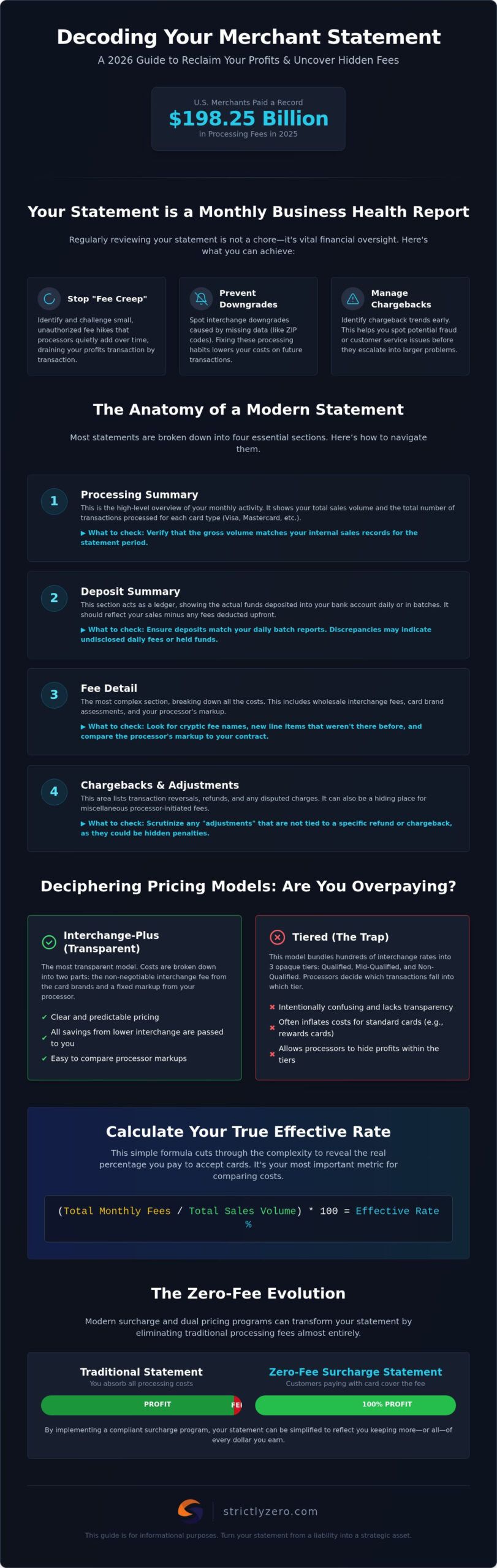
U.S. merchants paid a record $198.25 billion in credit and debit card processing fees in 2025; yet, most business owners still find their monthly bills nearly impossible to decipher. It’s frustrating to open a document filled with cryptic codes and sudden price hikes that seem to appear without notice. You shouldn’t need a finance degree to understand your own overhead. If you’ve ever felt like your processor is hiding the true cost of acceptance, learning how to read a merchant statement is the first step toward reclaiming your profit margins.
This 2026 decoding guide will empower you to deconstruct the complex layers of processing statements so you can identify hidden fees, calculate your true effective rate, and discover the path to zero-fee processing. We’ll examine the latest Mastercard and Visa interchange updates, show you how to spot billing errors, and explain how modern surcharge programs can help you keep more of every dollar you earn.
Key Takeaways
- Identify the monthly “health report” metrics that reveal unauthorized fee hikes and chargeback trends before they impact your bottom line.
- Master how to read a merchant statement by deconstructing the processing summary and deposit tracking to see exactly where your money goes.
- Spot the difference between transparent interchange-plus pricing and the “tiered” traps that often inflate costs for standard transactions.
- Calculate your true effective rate with a simple formula to compare your actual costs against industry benchmarks and spot billing errors.
- Discover how surcharge and dual pricing engines can transform your statement by eliminating traditional processing fees entirely.
Table of Contents
- What is a Merchant Statement and Why Should You Review It?
- The Anatomy of a Modern Statement: 4 Essential Sections
- Deciphering Pricing Models: Interchange-Plus vs. Tiered
- How to Calculate Your Effective Rate and Spot Red Flags
- The Zero-Fee Evolution: Understanding Surcharge Statements
What is a Merchant Statement and Why Should You Review It?
A merchant statement acts as a monthly health report for your business, providing a detailed summary of your credit card sales and the associated costs of doing business. To understand this document, it helps to first understand What is a Merchant Account? and how it facilitates these daily transactions. A merchant statement is the primary document for calculating the true cost of credit card acceptance. Reviewing this document isn’t just a back-office chore; it’s a vital part of financial oversight that protects your profit margins. You’ll often see two different identifiers on your paperwork: the Merchant ID (MID) for your processing account and a Gateway ID if you process online. Both are essential for tracking where your money goes across different payment channels.
With U.S. merchants paying a record $198.25 billion in processing fees in 2025, the stakes for your 2026 strategy are higher than ever. Monthly reviews are essential for spotting unauthorized fee hikes that processors often slip in without a formal announcement. Beyond just costs, your statement is a diagnostic tool for your business operations. It allows you to identify chargeback trends early, helping you spot potential fraud or customer service issues before they escalate into a bigger problem. If you don’t know how to read a merchant statement, you are essentially flying blind while one of your largest expenses fluctuates every month.
Key Information: The Header and Account Summary
Your statement header contains the Merchant Identification Number (MID). This unique string of digits is your account’s fingerprint; you’ll need it every time you call for support or technical assistance. It’s also important to check the statement period. Many processors don’t align their billing with the calendar month, which can make bank reconciliations tricky if you aren’t paying attention. Always verify that your business name and address are current. Inaccurate data isn’t just a typo; it can lead to costly PCI non-compliance fees that quietly drain your account because the processor assumes your security protocols are outdated.
The Impact of Neglecting Your Statement
Ignoring your monthly bill leads to “fee creep.” This happens when small, unauthorized price hikes are introduced over time, banking on the fact that you won’t notice a few extra cents per transaction. You should also look for “Interchange Downgrades.” These occur when a transaction doesn’t meet the security requirements for the lowest possible rate, often because of missing zip codes or tax data during entry. These downgrades signal that your current processing habits are costing you unnecessary money. By mastering how to read a merchant statement, you can use this data to feed into churn intelligence tools. These tools help you understand customer behavior and retention patterns based on payment data, turning a simple bill into a strategic asset for growth.
The Anatomy of a Modern Statement: 4 Essential Sections
Most processing bills look like a wall of text at first glance, but they generally follow a standard structure. Understanding the layout is half the battle when learning how to read a merchant statement. Most modern processors divide their reporting into four primary quadrants. The Processing Summary provides a high-level view of your total volume and transaction counts. This is where you’ll see the big picture of your monthly activity. The Deposit Summary follows, acting as a ledger for the actual cash flow hitting your business bank account. If these numbers don’t align with your daily batch reports, you likely have a reconciliation issue or an undisclosed fee being deducted daily.
The Fee Detail is the most complex section, where interchange, assessments, and markups are listed. This is where the bulk of your costs are hidden. To make sense of these varying costs, you should Calculate Your Effective Rate to see the true percentage you are paying across all card types. Finally, the Chargebacks and Adjustments section is where reversals, refunds, and disputed transactions appear. Unlike some competitors who gloss over this area, you should scrutinize it closely. This is often where “adjustments” that aren’t tied to a specific refund live, signaling that your processor may be sneaking in extra costs. For a more transparent approach, you might consider a provider that offers omni-channel reporting with clear line items.
Account Summary & Processing Totals
When reviewing your totals, you must distinguish between Gross Volume and Net Volume. Gross Volume is the total amount of sales you ran, while Net Volume is what remains after refunds and processing fees are deducted. Tracking your Average Ticket Size here is essential for small business credit card processing. If your average sale is small, per-transaction flat fees can eat a disproportionate amount of your profit. Your statement will also break down volume by card type, showing exactly how much of your business comes from Visa, Mastercard, Amex, and Discover.
Fee Breakdown: Wholesale vs. Markup
To truly master how to read a merchant statement, you must separate non-negotiable costs from processor profit. Interchange fees are the “wholesale” rates set by card networks and paid to issuing banks. These are fixed by the industry. Assessment fees are also non-negotiable; as of 2026, Visa charges 0.14% for credit transactions and 0.13% for debit, while Mastercard’s assessment sits at 0.1375% for most transactions. The Processor Markup is the only negotiable part of your bill. This is the flat fee or percentage your provider adds on top of wholesale costs to cover their services. If your markup feels high compared to the 2025 industry average combined credit card interchange rate of 2.36%, it might be time to look for a more competitive structure.
Deciphering Pricing Models: Interchange-Plus vs. Tiered
Your pricing model determines the entire layout of your monthly bill. If you want to master how to read a merchant statement, you must first identify which of the three main structures you’re currently using. The easiest way to tell is by looking at how your fees are grouped. If you see a long, granular list of different card types with their specific interchange rates, you’re likely on Interchange-Plus. This is the gold standard for transparency. It shows the exact wholesale cost from the card networks plus a flat, agreed-upon markup from your processor. It’s the only way to ensure you’re actually benefiting from the 2026 Visa and Mastercard settlement that aimed to reduce average credit interchange rates by 10 basis points.
Tiered pricing is the opposite. Instead of showing the real costs, your processor bundles transactions into three or four “buckets” labeled Qualified, Mid-Qualified, and Non-Qualified. This model is designed to be easy to read but nearly impossible to audit. Flat-rate pricing, often used by mobile processors, offers one single percentage for every transaction regardless of the card type. While it’s simple for a startup, it often costs established businesses thousands in unnecessary markups. You end up paying the same high rate for a low-cost debit card as you do for a premium rewards card, which is a massive drain on your cash flow.
The Dangers of Tiered Pricing
Tiered pricing is frequently used as a bait-and-switch tactic in credit card processing services. A provider might quote you a “Qualified” rate of 1.50%, which sounds competitive until you realize almost no modern cards actually qualify for it. Most transactions get “downgraded” to Mid-Qualified or Non-Qualified tiers because of rewards programs, corporate status, or even how the card was entered. These downgrades can double your costs instantly. Since the processor decides which card goes into which bucket, there is a total lack of transparency that usually works in their favor, not yours.
Identifying Flat-Rate and Subscription Models
Subscription or “membership” models have gained popularity in 2026. These models charge a fixed monthly fee and then pass through the interchange costs with zero percentage markup. You’ll see this on your statement as a single, large monthly line item followed by a list of wholesale fees. This is often better than flat-rate pricing for businesses processing higher volumes. However, you still need to know how to read a merchant statement to verify that the “wholesale” rates being passed to you aren’t being padded. Even a “simple” flat-rate bill can hide the fact that you’re paying a massive markup on a regulated debit card that should only cost 0.05% plus 21 cents.
How to Calculate Your Effective Rate and Spot Red Flags
Understanding how to read a merchant statement is useless if you can’t translate those hundreds of line items into a single, actionable number. This is where the Effective Rate comes in. It’s the ultimate equalizer that cuts through the noise of “wholesale” vs. “markup” and tells you exactly what percentage of your revenue is disappearing into the processing machine. For businesses heavily reliant on ecommerce payment processing, this metric is your most important KPI. Online transactions often carry higher interchange costs because the card isn’t present, so tracking this rate month over month is the only way to ensure your margins aren’t being quietly eroded by shifting card brand rules.
Keep a sharp eye out for Red Flags like “integrity fees” or “kilobyte fees.” These are often arbitrary charges added by processors to pad their own bottom line under the guise of technical necessity or data transmission costs. Even if you’re on a supposedly transparent Interchange-Plus plan, these small additions can bloat your costs without providing any extra value. If your statement is cluttered with these vague terms, it’s a clear sign you should switch to a transparent zero-fee processing model to protect your revenue.
Step-by-Step Effective Rate Calculation
To find your true cost, you don’t need to analyze every single transaction. Locate the “Total Fees” line item at the bottom of your statement. Divide that number by the “Gross Sales” or “Total Volume” for the month, then multiply by 100. This gives you your Effective Rate percentage. An effective rate over 3.5% usually indicates significant room for cost optimization. If your rate is climbing while your sales volume stays the same, your processor likely implemented a mid-contract price hike that you missed because the statement was too confusing to audit.
Hidden Fees to Watch For
Beyond the obvious transaction costs, several “junk fees” often hide in plain sight. PCI Non-Compliance fees are a major offender; this is a monthly penalty, sometimes as high as $100, that can be avoided by completing a simple annual security survey. Batch Header fees are another drain on your resources. These are small daily charges, often around $0.25 to $0.50, that occur every time you close out your terminal. While they seem insignificant, they add up over 30 days. Finally, watch for “Regulatory Product Fees.” These are vague terms used to hide additional processor markups that have nothing to do with actual government or card brand regulations.
The Zero-Fee Evolution: Understanding Surcharge Statements
The traditional processing bill is a list of subtractions. Every line item represents a portion of your hard-earned revenue being redirected to banks and networks. However, as the payments landscape shifts in 2026, many businesses are moving toward a zero fee credit card processing model. When you look at a surcharge-based statement, the visual hierarchy changes completely. Instead of seeing a massive “Total Fees” deduction at the bottom of the page, you’ll see a “Surcharge” or “Service Fee” line item that reflects the costs passed to customers at the point of sale. This effectively offsets your processing overhead in real-time.
Understanding how to read a merchant statement in this context requires looking for the “Dual Pricing” breakdown. This section shows the distinct settlements for cash versus credit card transactions. Strictly’s smart pricing engine ensures that these line items are 100% compliant with state-by-state regulations, which is critical given the evolving legal rules for 2026. This technology automates the complex math required to keep your business within the law while eliminating your processing expenses. It transforms the statement from a bill of costs into a record of recovered revenue.
Transitioning to a $0 Processing Fee Model
When you switch to this model, your statement reflects a “Net Settlement” that closely mirrors your “Gross Volume.” Traditional statements often show a significant gap between what you sold and what was deposited into your bank account. In a zero-fee environment, that gap disappears. The statement will explicitly show the “Offset Amount,” proving that the fees were collected from the cardholder rather than your business revenue. It’s a cleaner, more transparent way to handle your finances. It removes the need for constant auditing of hidden processor markups and protects your business from the “fee creep” discussed earlier.
Next Steps: Auditing Your Current Statement
Now that you know how to read a merchant statement and identify the red flags of traditional billing, it’s time to take action. You don’t have to guess if you’re overpaying. By comparing your current effective rate to the best credit card processing for small business models, you can see exactly how much profit you’re leaving on the table. Most traditional processors won’t tell you about these fee-elimination programs because it cuts into their profit margins. Don’t let opaque billing structures hold your business back. Upload your statement for a free Strictly audit and start your journey to $0 fees.
Take Control of Your Processing Costs
Deciphering your monthly bill is the only way to stop the “fee creep” that drains your revenue. Now that you’ve mastered how to read a merchant statement, you can calculate your effective rate and spot the red flags of tiered pricing or unnecessary compliance penalties. Remember, a statement is a diagnostic tool. If yours shows an effective rate above 3.5% or is cluttered with vague “regulatory” fees, it’s time to demand better transparency.
The payments industry in 2026 offers more control than ever before. You don’t have to accept opaque billing as the cost of doing business. By moving to a unified omni-channel platform, you can simplify your reporting and protect your margins with AI-driven fraud prevention. Most importantly, you can stop paying for your customers’ rewards points. Our compliant surcharge and dual pricing engine handles the legal heavy lifting for you, ensuring every transaction is processed fairly and legally. It’s time to turn your monthly bill into a zero-dollar report.
Switch to Strictly and eliminate your processing fees today. You’ve worked hard to build your business; you deserve to keep the revenue you earn.
Frequently Asked Questions
What is the most important number on my merchant statement?
The effective rate is the most critical metric because it reveals the true percentage of revenue you lose to processing costs. While your provider might highlight a low teaser rate, the effective rate includes all markups, batch fees, and monthly dues. To find it, divide your total monthly fees by your gross processing volume and multiply by 100.
Why is my effective rate higher than the rate I was promised?
Most promised rates only apply to “qualified” transactions, such as basic debit cards or non-reward credit cards. In reality, most customers use rewards or corporate cards that fall into higher-cost tiers. These “non-qualified” surcharges, combined with fixed monthly fees and per-transaction costs, drive your actual percentage far above the initial quote you received.
What are interchange fees and can I negotiate them?
Interchange fees are wholesale costs set by card networks like Visa and Mastercard that are paid to the card-issuing banks. These rates are non-negotiable for both merchants and processors. As of 2026, these costs are determined by card type and transaction method; for example, a regulated debit card carries a much lower interchange cost than a premium World Elite card.
How do I spot hidden fees on my processing statement?
Look for vague line items in the fee detail section like “Regulatory Product Fee,” “Integrity Fee,” or “Kilobyte Fee.” Learning how to read a merchant statement involves identifying these arbitrary markups that aren’t tied to actual card brand assessments. If a charge doesn’t clearly match a verified interchange rate, it’s likely a processor markup designed to pad their profit.
What is the difference between gross and net processing volume?
Gross volume is the total dollar amount of all sales processed before any deductions are made. Net volume is the actual cash amount deposited into your business bank account after fees, refunds, and chargebacks are removed. A significant gap between these two figures indicates that your processing overhead is eating a large portion of your monthly revenue.
Can I switch to a zero-fee processing model if I have a contract?
You can usually transition to a surcharge or dual pricing model without breaking your existing processing agreement. Most providers allow you to update your pricing structure to help manage costs. A compliant surcharge engine can be integrated into your current setup to offset the expenses you identify once you understand how to read a merchant statement.
What does ‘PCI Non-Compliance’ mean on my bill?
This is a monthly penalty fee, often ranging from $20 to $100, charged when a business hasn’t verified that their systems meet data security standards. It’s essentially an avoidable “junk fee.” You can typically remove this charge immediately by completing a mandatory annual security survey through your processor’s online compliance portal.
How often should I audit my merchant processing statements?
You should perform a quick review every month and a deep audit at least twice a year. Card networks generally update their interchange schedules every April and October. Regular audits ensure you aren’t being hit with unauthorized price hikes or new administrative fees that processors often introduce without providing a clear, formal notice to the business owner.