
How to Use Payment Links: A 2026 Guide to Faster, Fee-Free Payments
Published:

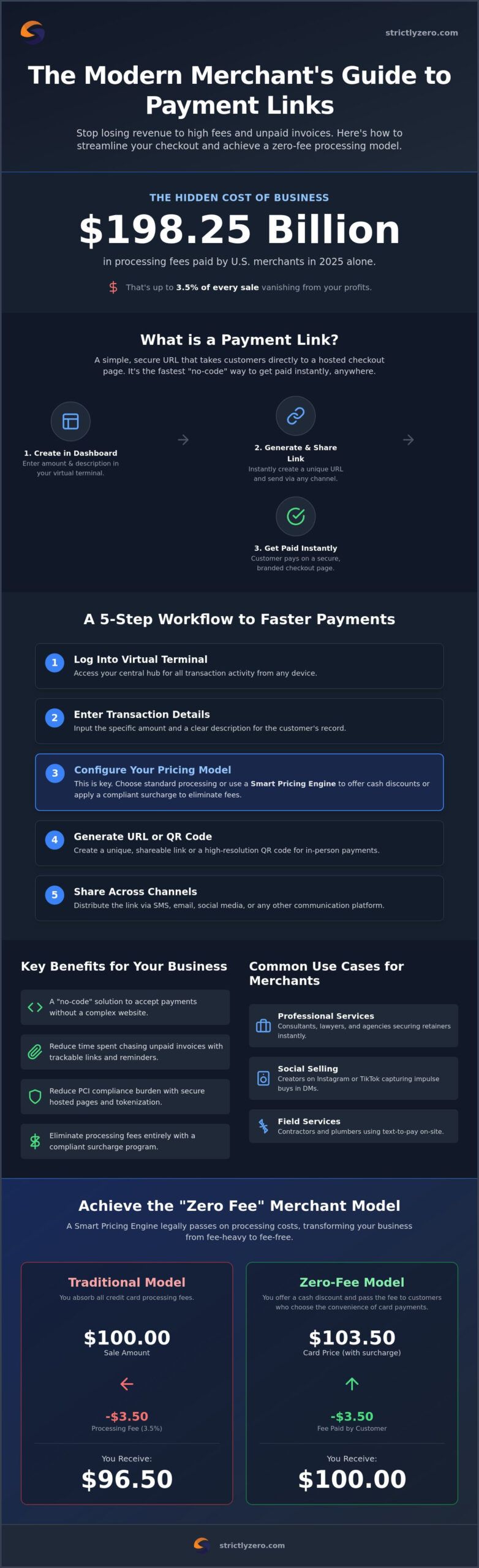
U.S. merchants handed over a staggering $198.25 billion in processing fees in 2025 alone. If your business is tired of watching up to 3.5% of every sale vanish into thin air, it’s time to rethink your checkout strategy. Learning how to use payment links is the fastest way to stop the bleed and take back control of your margins. These simple, secure URLs allow you to accept payments instantly without a complex website or a traditional gateway setup.
It’s frustrating to feel like you’re working for the banks when high fees eat your profits and unpaid invoices clutter your inbox. We promise to show you a better way. This guide explains how to create, share, and manage payment links to streamline your sales. We’ll also explore modern surcharge strategies that help you legally pass on processing costs using a smart pricing engine. By the end, you’ll have a clear roadmap to faster checkouts and a zero-fee merchant model that keeps your cash flow healthy.
Key Takeaways
- Discover a “no-code” solution to accept payments instantly without the need for an expensive or complex e-commerce website.
- Master how to use payment links through a virtual terminal to generate secure checkout URLs for any transaction in seconds.
- Learn the best channels for link distribution, including SMS and email, to significantly reduce the time spent chasing unpaid invoices.
- Implement a compliant surcharge program and smart pricing engine to eliminate credit card processing fees and protect your business margins.
- Understand how hosted payment pages and tokenization reduce your PCI DSS compliance burden while keeping customer data safe.
Table of Contents
- What Are Payment Links and Why Does Your Business Need Them?
- How to Use Payment Links: A Step-by-Step Workflow
- Strategic Distribution: Where to Share Your Payment Links
- Security and Compliance: Ensuring Safe Transactions
- Maximizing Profit: Integrating Zero-Fee Surcharge Programs
What Are Payment Links and Why Does Your Business Need Them?
A payment link is a unique URL that sends your customer straight to a secure, hosted checkout page. It is the simplest way to modernize your business without hiring a web developer or maintaining a complex e-commerce storefront. By integrating these links into your existing payment system, you bypass the friction of traditional gateways. You simply enter the transaction details into a dashboard, generate the link, and send it to your customer via their preferred communication channel.
Speed is the ultimate competitive advantage for any merchant. Learning how to use payment links allows you to move from a fresh product idea to a live “Buy Now” button in under 60 seconds. This “no-code” approach means you can test new markets or offer custom quotes without technical hurdles. Strictly provides an omni-channel platform where you can generate these links via a virtual terminal in seconds, ensuring you never miss a sale because of technical lag.
To better understand this concept, watch this helpful video:
This technology is a core pillar of a “Zero Fee” merchant model. When you use how to use payment links strategies effectively, you aren’t just making it easier for customers to pay. You’re also setting the stage for a compliant surcharge program that protects your margins. This shift toward omni-channel payments means your sales aren’t limited to a physical location. Your storefront is now wherever you can paste a link, from a WhatsApp chat to a LinkedIn message.
Payment Links vs. Traditional Invoices
Static PDF invoices often sit in an inbox, ignored or forgotten. They create friction because customers have to manually type in billing details or log into a separate portal. Payment links are different. They offer real-time tracking, so you’ll know exactly when a client views the link. If they don’t pay immediately, automated reminders can nudge them toward completion. This reduces the manual work of chasing payments and keeps your cash flow steady.
Common Use Cases for Modern Merchants
- Professional services: Consultants, lawyers, and specialized coaching experts like golfstateofmind.com use links to get retainers or training fees paid instantly during a discovery call.
- Field services: Contractors, plumbers, or landscapers send a quick text-to-pay link the moment a job is finished to ensure they get paid before leaving the site.
How to Use Payment Links: A Step-by-Step Workflow
Modernizing your checkout process is straightforward when you follow a structured workflow. Most small businesses find that the ability to accept electronic payments is the fastest way to improve their bottom line and keep revenue flowing. Understanding how to use payment links effectively starts with choosing the right dashboard and setting up your transaction parameters correctly.
Step 1: Log into your virtual terminal or payment processing dashboard. This is your central hub for all transaction activity. Step 2: Enter the transaction details, including the specific amount and a clear description for the customer. Step 3: Configure your pricing model. This is where you decide between standard processing or using a Smart Pricing Engine to offer a cash discount or apply a compliant surcharge. Step 4: Generate the unique URL or a high-resolution QR code for in-person scans. Step 5: Share the link across your preferred communication channels, such as SMS, email, or a social media message. It’s that simple.
Configuring Your Link for Maximum Conversion
A generic checkout page can cause cart abandonment. To build trust, add your custom branding and company logo to the hosted page. You should also set expiration dates for links tied to limited-time quotes; this creates a sense of urgency that encourages faster payment. Don’t forget to enable multiple payment methods. Offering credit, debit, and digital wallets ensures that every customer can pay using their preferred method without friction. If you want to see these features in action, you can explore our surcharge solutions to see how we automate the entire process.
Managing Links via a Virtual Terminal
For businesses handling high volumes, a virtual gateway is essential for organization. This tool allows you to manage bulk links, track which ones are pending, and even void or edit active links if a customer changes their order. Integrating these links with your existing CRM or accounting software ensures that your books stay balanced without manual data entry. Knowing how to use payment links within a managed terminal environment gives you the oversight needed to scale your operations without adding administrative overhead.
Strategic Distribution: Where to Share Your Payment Links
Creating the URL is only half the battle. To see real results, you must master the art of distribution. An omni-channel strategy ensures your checkout process is available wherever your customers are, whether that’s in an inbox, a text thread, or a social media feed. Understanding how to use payment links across different platforms turns every digital touchpoint into a potential sale. By meeting customers in their preferred apps, you remove the friction that usually leads to abandoned carts.
SMS and Text-to-Pay are currently leading the way in conversion rates. With digital wallet adoption projected to surpass 5.2 billion users by the end of 2026, sending a link via text allows customers to pay with a single tap. Service-based businesses see much faster turnaround times when they move away from traditional billing and toward mobile-first links. It’s a simple shift that aligns with the fact that over 60% of the world’s population now relies on digital wallets for daily transactions.
Email marketing remains a powerhouse for both B2C and B2B merchants. Instead of sending a generic newsletter, you can embed “Pay Now” links directly into your product announcements or follow-up emails. Social media bio links also play a vital role. They allow you to turn followers into customers instantly, bypassing the need for a full e-commerce storefront. For physical interactions, QR codes bridge the gap between the real world and your digital terminal. You can print them on signage, business cards, or even physical invoices to give customers a frictionless way to settle their balance.
B2B and Professional Service Strategies
Professional services often struggle with long payment cycles. One effective tactic is embedding payment links directly into your digital email signature. This ensures that every piece of correspondence includes a way for clients to pay their retainers or settle outstanding balances without searching for an old invoice. For recurring work, you can use links to set up subscription-based billing, ensuring you get paid on time without manual monthly reminders. Providing links in chat support also allows your team to resolve billing inquiries the moment they happen.
In-Person and Mobile Sales
Field services and mobile vendors no longer need to carry bulky equipment to get paid. By generating a QR code on a mobile device, you can accept “contactless” payments in person. This is particularly useful for taking deposits while on-site for a job or finalizing a sale at a pop-up event. Adopting this mobile-first approach significantly reduces the need for expensive physical POS hardware in the field. It keeps your operations lean while providing the professional checkout experience your customers expect in 2026.
Security and Compliance: Ensuring Safe Transactions
Security is the backbone of any digital transaction. When you learn how to use payment links, you’re not just sending a URL; you’re providing a secure bridge between your business and your customer’s wallet. Most modern payment links rely on hosted checkout pages. This is a major advantage because it offloads the burden of PCI DSS compliance. Since the sensitive data never touches your servers, your security requirements are significantly reduced, and the risk of a data breach is minimized.
Tokenization adds another layer of protection. It replaces actual card numbers with unique identifiers, ensuring that even if a link were intercepted, the data would be useless to hackers. In 2026, AI-driven fraud prevention is no longer optional. These tools monitor link activity in real-time to flag suspicious patterns before a transaction is finalized. Beyond the technical side, a professional checkout UI builds psychological trust. Customers are more likely to complete a purchase when the page looks polished and displays familiar security badges.
The Legalities of Surcharging on Payment Links
Handling the legal side of payments is complex. As of July 2026, credit card surcharging is prohibited in Connecticut, Massachusetts, and Maine. In California, the Honest Pricing Law (SB 478) requires advertised prices to include all mandatory charges, effectively banning surcharges added at the point of sale. Colorado merchants must adhere to a 2% surcharge cap. Card networks also have their own rules; Visa and Discover cap surcharges at 3%, while Mastercard allows up to 4%. A Smart Pricing Engine automates these rules for every link you send, ensuring you stay compliant across state lines without manual calculations.
Protecting Your Business from Chargebacks
Chargebacks can devastate small margins. To fight them, you should require digital signatures or terms-of-service acceptance directly on the checkout page. Detailed transaction descriptions also help prevent “unrecognized charge” disputes. Your dashboard should track IP addresses and provide delivery confirmation to give you the evidence needed if a dispute arises. Understanding how to use payment links with these safeguards in place protects your revenue from bad actors and honest mistakes alike.
Ready to secure your sales? You can partner with a processor that prioritizes compliance to keep your business safe and your margins protected.
Maximizing Profit: Integrating Zero-Fee Surcharge Programs
Most merchants view processing fees as an unavoidable business tax. In 2025, U.S. merchants paid a record $198.25 billion in processing fees, a number that continues to climb as digital transactions dominate the market. When you learn how to use payment links, you shouldn’t just focus on the convenience of the URL. You should focus on how that link impacts your bottom line. Flat-rate processors often charge 2.9% plus a $0.30 transaction fee. While that sounds small, it aggressively eats into your margins, especially on high-ticket items or high-volume sales.
Integrating zero fee credit card processing into your workflow changes the financial math of your business. Instead of the merchant absorbing the cost of every swipe, the cost is managed through a compliant surcharge or dual pricing model. A modern surcharge engine is essential here. It detects whether a customer enters a debit card or a credit card instantly. This automation is critical because surcharging debit cards is prohibited by card network rules. By using a smart system, you ensure every link remains compliant while protecting your profits.
The Math of a Zero-Fee Payment Link
Consider a $1,000 transaction. With a standard payment link, you might lose roughly $30 to processing fees, leaving you with $970. By using a surcharge-enabled link, you retain the full $1,000. Implementing a surcharge on your payment links saves you $30 for every $1,000 in sales volume. Communicating this to customers is about transparency. By showing a “Card Price” and a “Cash Discount Price” within the link UI, you give the customer a choice. Most customers understand the cost of convenience and are happy to pay for the security of a digital checkout.
Setting Up Your Zero-Fee Link System
To get started, you need to partner with a credit card processing company that natively supports dual pricing and smart surcharging. Once your account is active in the virtual terminal, you can begin generating links that apply these rules automatically. Always test your links before a major rollout to ensure the “Smart Pricing” logic triggers correctly based on the card type entered. This proactive approach removes the legal risk and the manual calculations from your daily operations. Mastering how to use payment links with a zero-fee model is the most effective way to scale your business in 2026 without sacrificing your hard-earned revenue.
Ready to stop paying fees? Get started with Strictly’s Zero-Fee Payment Links.
Take Control of Your Revenue Strategy for 2026
You’ve seen how shifting to a modern payment model can transform your business from a fee-heavy operation into a lean, profit-focused machine. By mastering how to use payment links, you eliminate the need for complex website setups while drastically reducing the time it takes to get paid. Whether you’re sending links via SMS for instant field service payments or embedding them in B2B email signatures, the goal remains the same: faster checkouts and protected margins.
Security doesn’t have to be a burden when you leverage hosted pages and automated compliance. Our omni-channel virtual terminal integration and AI-driven fraud prevention work behind the scenes to keep your transactions safe. You can easily eliminate your processing fees with Strictly Payment Links, using our compliant surcharge and dual pricing engine to ensure you keep every dollar you earn. It’s time to stop letting processing costs dictate your growth. Start streamlining your sales today and watch your cash flow thrive.
Frequently Asked Questions
Are payment links safe for my customers to use?
Yes, payment links are highly secure because they use hosted checkout pages that manage sensitive data off your servers. This setup reduces your PCI DSS compliance burden while ensuring that customer card details are protected through tokenization. Modern processors also integrate AI-driven fraud prevention to monitor transactions in real-time. This helps detect and block suspicious activity before a sale is finalized, giving your customers peace of mind during checkout.
Do I need a website to use payment links?
No, you don’t need an e-commerce website or any coding knowledge to use this technology. Payment links function as standalone URLs that you can generate instantly from a virtual terminal. This “no-code” approach is perfect for professional services, social media sellers, or contractors. You simply create the link and send it directly to your customer, allowing them to pay via a secure, hosted page without visiting a traditional storefront.
How much does it cost to use payment links?
While industry averages for flat-rate processing often range from 2.9% to 3.5% plus a fixed fee, the actual cost to your business depends on your pricing model. Many merchants choose to eliminate these costs entirely by using a surcharge or dual pricing engine. This allows you to pass the processing fee to the customer legally. When you understand how to use payment links with a zero-fee model, you keep 100% of your margins on every sale.
Can I use payment links for recurring or subscription payments?
Yes, many modern payment platforms allow you to configure links for recurring billing and subscription services. You can set up a link that authorizes a customer to be charged on a weekly, monthly, or annual basis. This is a common strategy for consultants, lawyers, and creative agencies who manage retainers. Using links for recurring payments reduces the manual work of sending monthly invoices and helps maintain a steady, predictable cash flow.
Is it legal to add a surcharge to a payment link?
Surcharging is legal in most of the U.S., but you must follow specific state and card network regulations. As of July 2026, credit card surcharging is prohibited in Connecticut, Massachusetts, and Maine, while California requires advertised prices to include all mandatory fees. Additionally, Colorado has a 2% cap on surcharges. Using a smart pricing engine is the best way to stay compliant because it automatically detects the customer’s location and card type before applying a fee.
How long does it take for money from a payment link to reach my bank account?
Most transactions settle within one to two business days, though exact timing depends on your payment processor. Some systems offer instant or same-day funding for businesses that need immediate access to their revenue. The speed of settlement is often influenced by the time of day the customer completes the checkout. Tracking these transactions through your dashboard allows you to see exactly when funds are cleared and ready for your bank account.
What is the difference between a payment link and a virtual terminal?
A virtual terminal is the merchant-facing dashboard where you manage your business, while a payment link is the customer-facing URL generated by that terminal. When learning how to use payment links, you’ll use the virtual terminal to enter the transaction amount and description. The terminal then creates the unique link that you share with your buyer. Essentially, the terminal is your backend tool, and the link is the digital “checkout counter” for your customer.
Can I send a payment link via text message (SMS)?
Yes, sending links via SMS is one of the most effective distribution methods available today. Text-to-pay strategies have significantly higher open rates than traditional email, making them ideal for field services or mobile vendors. Once you generate the link in your terminal, you can paste it into a text message. The customer simply taps the link on their phone, chooses their preferred digital wallet or card, and completes the payment in seconds.