

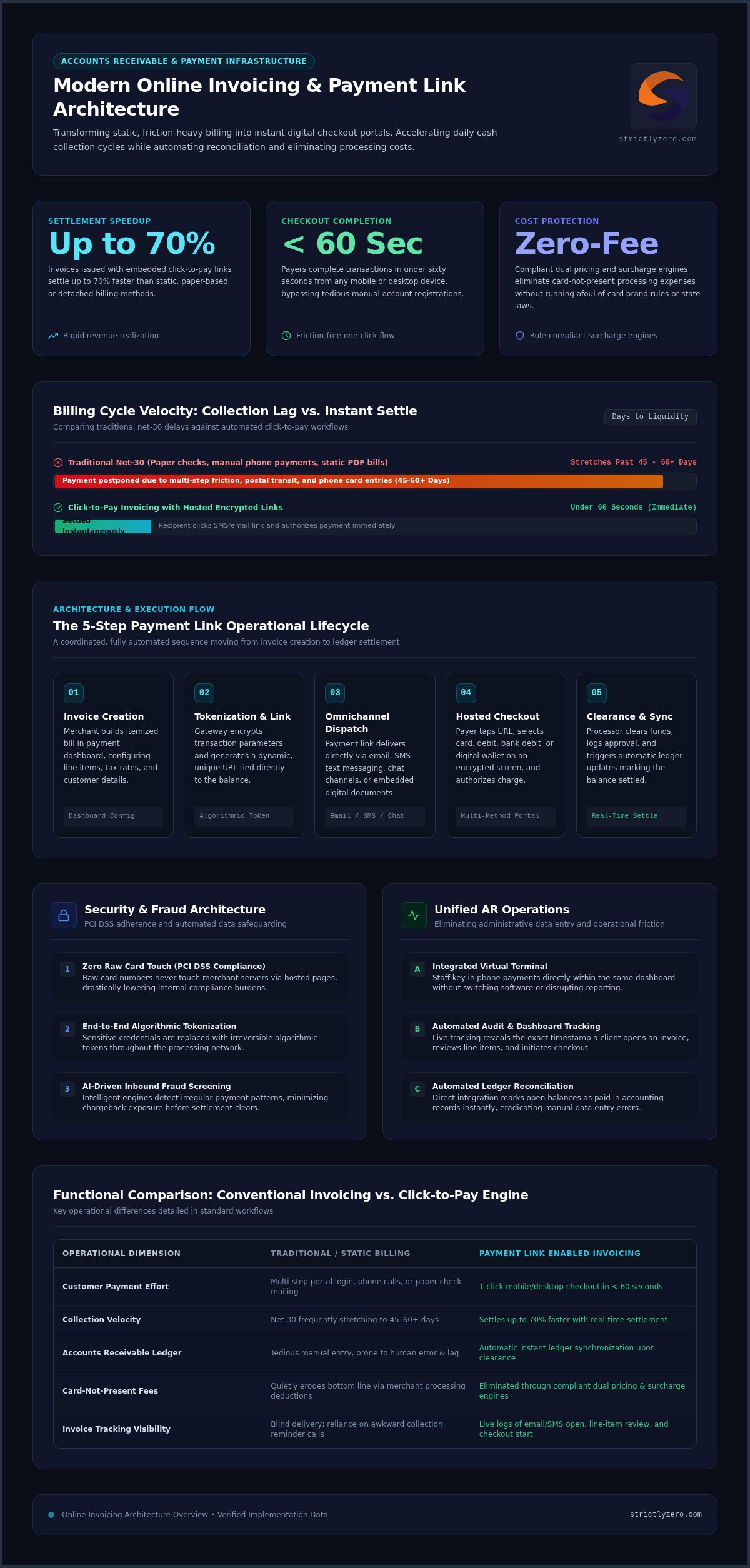
Invoices issued with embedded click-to-pay options settle up to 70% faster than static billing methods, yet countless companies still spend weeks waiting on paper checks or manual bank transfers. Chasing down overdue balances is awkward and exhausting, especially when conventional card processing quietly cuts into your bottom line. Switching to modern online invoicing with payment link technology replaces that administrative friction with speed, giving your clients an effortless one-click checkout while keeping your revenue intact.
In this guide, you will discover how smart digital invoicing accelerates daily cash flow, streamlines reconciliation, and eliminates card processing costs through compliant surcharge and dual pricing engines. We will examine how automated invoice tracking works, unpack the tools that unify your payment channels, and show you how to upgrade your accounts receivable without disrupting existing operations.
Key Takeaways
- Deploying online invoicing with payment link functionality turns static bills into instant checkout portals that noticeably accelerate your collection cycles.
- Encrypted transaction links connect directly to your accounting records, automating invoice reconciliation while preventing tedious manual data entry errors.
- Modern dual pricing and surcharge engines eliminate card-not-present merchant costs without running afoul of state laws or card brand rules.
- Centralizing your accounts receivable across virtual terminals, SMS links, and automated recurring billing unifies remote and back-office payment operations.
- Intelligent card detection and AI-driven fraud prevention safeguard your checkout workflow while ensuring eligible transactions remain fully compliant.
What Is Online Invoicing with Payment Link Technology?
Traditional invoicing isolates billing from the actual payment mechanism. A business issues a document, and the customer must take separate steps to log into an online portal, dial an office phone to read card numbers, or post a paper check. Deploying online invoicing with payment link technology bridges this operational gap by embedding dynamic, clickable checkout URLs directly into digital bills delivered via email or SMS.
When recipients tap the link, they bypass account registrations and reach a hosted, encrypted checkout page. This interface allows them to settle their balance immediately using credit cards, debit cards, bank transfers, or digital wallets. Both parties receive instantaneous transaction confirmations, eliminating physical paper handling and phone-based card data entry entirely.
The Core Mechanics of Click-to-Pay Invoices
Click-to-pay systems combine document generation with payment tokenization. The technical workflow operates across several automated steps:
- Dynamic URL Generation: The invoicing platform creates a unique, encrypted payment link tied to the exact customer record and invoice balance.
- Multi-Method Checkout: The hosted checkout screen dynamically presents authorized payment rails, accommodating credit cards, direct bank debit, and mobile wallets.
- Automated Ledger Synchronization: Upon successful settlement, the payment engine updates internal accounts receivable records in real time, marking open balances as paid without manual intervention.
Online Invoicing vs Traditional Billing Methods
Paper invoicing and static PDF attachments introduce unnecessary lag into your cash collection cycle. Standard net-30 terms frequently stretch past 45 or 60 days simply because payers postpone multi-step payment tasks. In contrast, dynamic click-to-pay links allow buyers to complete transactions in under sixty seconds from any desktop or mobile device.
Adopting an online invoicing with payment link infrastructure also delivers comprehensive audit transparency. Rather than wondering whether a client received your bill, cloud tracking dashboards reveal the exact moment a recipient opens the invoice, inspects line items, and initiates checkout. This automated visibility replaces awkward reminder phone calls with clear, data-driven collection timelines.
How Payment Links Operate Across Modern Payment Gateways
Generating a click-to-pay request involves a coordinated, highly automated transaction sequence behind the scenes. When a business implements online invoicing with payment link capabilities, the operational lifecycle moves systematically from invoice creation to ledger settlement:
- Step 1 (Invoice Creation): The merchant builds an itemized bill inside their payment management dashboard, configuring line items, tax rates, and customer details.
- Step 2 (Tokenization & Link Generation): The gateway encrypts the transaction parameters and produces a unique, secure URL tied directly to the balance.
- Step 3 (Multi-Channel Dispatch): The bill delivers via email, SMS text messaging, chat channels, or embedded within a digital document.
- Step 4 (Hosted Checkout Submission): The payer opens the link, landing on a secure payment screen to select their preferred payment method and authorize the charge.
- Step 5 (Clearance & Reconciliation): The processor validates available funds, logs approval, and triggers automatic ledger updates that mark the invoice as settled.
Security Architecture and Data Encryption
Transmitting financial details requires strict adherence to PCI DSS standards. Hosted checkout pages ensure raw card numbers never touch merchant servers, dramatically lowering compliance obligations. Platforms utilize end-to-end tokenization, substituting sensitive cardholder credentials with irreversible algorithmic tokens. Additionally, advanced architectures deploy AI-driven fraud prevention to screen every inbound transaction, detecting irregular payment patterns and minimizing chargeback risks before funds transfer.
Virtual Terminal and Omnichannel Synchronization
Many billing setups stumble because they segregate remote payment links from everyday back-office tools. A robust platform bridges this divide by linking payment generation directly with an integrated virtual terminal. If a client prefers to settle an invoice over the phone rather than clicking an email link, an internal team member can key in the card details immediately without switching software or disrupting reporting.
Consolidating these touchpoints ensures your business commands full visibility across every channel. Modern systems allow teams to leverage unified ecommerce payment processing across mobile, desktop, and remote workstations. Unifying these workflows prevents disconnected transaction records, simplifies end-of-month reconciliations, and keeps accounts receivable running smoothly. If you want to streamline operations across all collection methods, consider exploring how omnichannel payment platforms unify your entire checkout pipeline.
Comparing Invoicing Solutions: Standard Gateways vs Zero-Fee Surcharge Models
Most guides present digital payment links as simple checkout shortcuts. What standard gateway providers rarely emphasize is how card-not-present merchant fees steadily erode receivables. Every time a customer settles an invoice through a standard link, conventional processors deduct transaction fees directly from the payout before the net funds reach your bank account.
For high-ticket service providers, contractors, and agencies, absorbing these overhead deductions on every transaction causes major margin contraction. Combining online invoicing with payment link tools alongside an automated zero-fee surcharge or dual pricing model changes the financial equation entirely, enabling businesses to collect their full invoiced amount.
The True Cost of Card-Not-Present Invoicing
Remote payments carry higher interchange rates than physical card swipes due to perceived risk differences across card networks. When dealing with significant transaction volumes, small percentage deductions translate into tens of thousands of dollars in lost operating income over an entire year. Reviewing credit card processing for small business structures highlights how quickly compounding fees quietly drain revenue from everyday operations.
How Smart Surcharging Protects Bottom-Line Profits
Zero-fee processing models restore margins by shifting payment costs away from the merchant. Rather than absorbing fees, businesses can adopt two distinct, transparent approaches:
- Automated Surcharging: The checkout engine dynamically detects when a buyer chooses a credit card, automatically adding a compliant fee to the total while keeping the base invoice intact.
- Dual Pricing Models: The payment portal displays two clear prices side by side: a standard price for card settlement and a discounted price for fee-free payment rails like ACH bank transfers or cash equivalents.
Regulatory compliance remains the biggest hurdle in manual fee offsetting. Network regulations and federal statutes strictly prohibit surcharging on debit or prepaid cards, regardless of whether a payer runs them as credit. A modern online invoicing with payment link platform resolves this issue through real-time Bank Identification Number (BIN) lookups, identifying card types instantly and removing surcharges whenever a customer enters debit details. Adopting zero fee credit card processing ensures businesses protect their bottom line without breaching complex state or card brand compliance standards.
Key Criteria for Selecting an Invoicing Platform with Payment Links
Choosing billing software often gets reduced to comparing template designs or export options. For organizations managing substantial receivables, functional capability matters far more than aesthetics. Selecting the right solution for online invoicing with payment link deployment means evaluating how effectively the software protects operating margins, streamlines staff workflows, and manages regulatory exposure.
Automated Regulatory and Card Brand Compliance
Passing card costs to purchasers requires navigating complex legal standards. Card network rules strictly ban surcharges on debit and prepaid cards, while several jurisdictions, including Connecticut, Massachusetts, and California, enforce explicit statutory restrictions or disclosure mandates on checkout fees. A capable invoicing gateway handles these jurisdictional rules automatically. The system should identify card categories via real-time BIN detection and adjust checkout lines dynamically. Clear, itemized disclosures protect your firm against costly non-compliance audits while maintaining complete billing transparency.
Workflow Automation and Dunning Management
Manual collections drain administrative energy. Top-tier invoicing engines replace manual follow-ups with programmable automated communication schedules:
- Automated Reminder cadences: Scheduled email and SMS notices reach clients before due dates hit, drastically cutting down overdue balances.
- Preemptive Expiration Alerts: Systems flag expiring stored cards in advance, prompting payers to refresh payment methods before recurring charges fail.
- Client Billing Hubs: Dedicated self-service portals let customers download historical receipts, view past invoices, and settle outstanding balances on their own schedule.
Omnichannel Payment Flexibility
A customer payment portal should never operate in an operational silo. Modern businesses need platforms that unite hosted checkouts, direct payment links, and virtual gateway entry points under one administrative roof. Exploring professional credit card processing services helps leadership teams match internal accounting infrastructure with diverse client payment habits. Providing a versatile platform lets payers select between card payments and direct bank transfers effortlessly. If you are ready to modernize your accounts receivable with compliant automation, explore Strictly’s zero-fee payment solutions today.
Eliminate Invoicing Overhead with Strictly’s Zero-Fee Payment Engine
Capturing receivables quickly shouldn’t require surrendering your margins to card processing fees. While traditional billing software forces merchants to absorb transaction deductions, Strictly transforms standard online invoicing with payment link technology into a profit-protecting asset. By uniting digital invoicing, virtual terminals, and smart checkout links within an integrated platform, businesses can manage back-office billing and remote collections from a single administrative hub.
At the center of the platform is Strictly’s proprietary Smart Pricing Engine, which enables organizations to operate within a true zero-fee processing model. Combined with enterprise-grade AI-driven fraud prevention that actively monitors incoming transactions to reduce chargeback disputes, companies protect both their revenue and their customer relationships.
Automated Dual Pricing and Surcharge Intelligence
Executing compliant fee mitigation manually across different states and card networks is nearly impossible for busy administrative teams. Strictly automates this entire workflow at the point of checkout:
- Intelligent Card Detection: Built-in BIN technology automatically identifies debit cards the moment a customer enters payment details, immediately removing surcharges to guarantee federal compliance.
- State-Specific Rules: The engine factors in regional regulations dynamically, adjusting available pricing structures based on jurisdictional requirements.
- Clear Price Transparency: Hosted checkout screens present distinct, itemized options, clearly displaying card totals alongside cash-discounted alternatives like bank transfers.
Deploying Enterprise-Grade Invoicing Without Developer Overhead
Upgrading your billing infrastructure shouldn’t demand a team of software developers. Strictly delivers an intuitive, web-based dashboard that lets your team generate branded, itemized payment links in seconds. Staff can dispatch links through email or SMS, trigger one-off invoices, or configure automated recurring billing schedules for ongoing service retainers.
By centralizing customer billing, virtual terminal processing, and compliance automation, your team spends less time reconciling statements and zero time chasing paper checks. Connect with our specialists today to eliminate payment processing overhead and upgrade your daily accounts receivable operations.
Accelerate Cash Flow and Safeguard Your Margins
Waiting weeks for paper checks and sacrificing earned revenue to merchant fees no longer needs to be the standard cost of doing business. Adopting modern online invoicing with payment link capabilities solves both operational hurdles at once, accelerating cash collection cycles while delivering a seamless checkout experience your clients appreciate.
By bringing click-to-pay links, virtual terminals, and recurring billing together within one unified omnichannel platform, Strictly streamlines your entire billing workflow. Our proprietary Smart Pricing Engine automatically maintains state-by-state compliance and detects card types dynamically, while enterprise AI-driven fraud screening actively monitors transactions to protect your bottom line.
You don’t have to choose between fast electronic payments and healthy profit margins. Upgrade to zero-fee invoicing with Strictly today and transform your accounts receivable into an effortless, cost-effective engine for growth.
Frequently Asked Questions
How does an online invoice with a payment link work for my clients?
Your client receives a digital invoice by email or text message containing an embedded button or URL. Clicking the link takes them directly to a hosted, mobile-friendly payment screen where their balance and invoice line items are already populated. They simply choose their preferred payment method, enter their payment details, and confirm the transaction. The system immediately delivers a digital receipt, requiring zero account logins or tedious manual steps from the payer.
Are payment links secure for collecting customer credit card information?
Yes, modern payment links provide enterprise-grade protection for customer payment data. Transactions process through hosted checkout pages that comply with rigorous PCI DSS security mandates, meaning sensitive card numbers never touch or reside on your internal servers. Advanced platforms also incorporate point-to-point tokenization alongside AI-driven fraud prevention to verify card authenticity, flag suspicious purchasing patterns, and prevent unauthorized chargeback attempts before settlement occurs.
Can I legally pass credit card processing fees to clients via an invoice payment link?
Yes, merchants can legally offset transaction expenses if they follow card brand rules and jurisdictional legislation. Surcharging credit cards requires transparent checkout disclosure, compliance with national rate caps, and total exemption for debit cards. In states that ban direct surcharges, businesses can utilize dual pricing programs. These systems display standard card pricing alongside fee-free cash or bank transfer discounts, providing full legal compliance across all fifty states.
What is the difference between an online payment link and a virtual terminal?
An online payment link is customer-facing, allowing clients to review their bill and enter payment details independently on their own device. In contrast, a virtual terminal is an internal back-office interface where your staff manually enters card details provided over the phone or by mail. Leading payment processing platforms integrate both tools into a unified system, ensuring all transaction data, customer profiles, and ledger updates synchronize across channels seamlessly.
How do smart payment links handle debit card transactions versus credit cards?
Smart payment engines employ automated Bank Identification Number lookup technology to inspect the card type as soon as the customer inputs the first six digits. Under federal rules and card network standards, adding a surcharge to debit cards is strictly prohibited. If the system detects a debit or prepaid card, it dynamically removes any added fee before the payer authorizes the charge, guaranteeing total regulatory compliance.
Can I set up recurring automated invoicing with payment link software?
Yes, modern online invoicing with payment link solutions fully support recurring billing schedules. You can establish automated payment cycles for weekly retainers, monthly maintenance agreements, or phased project milestones. The software generates and dispatches invoices automatically, alerts clients when their stored payment method approaches its expiration date, and logs repeat payments directly into your accounts receivable ledger without requiring manual invoicing each billing period.
How fast do funds deposit into my business account after a client pays online?
Once a client completes an online payment, clearance begins immediately through the processing gateway. Digital card and direct bank transactions generally settle into your business account within standard commercial batch timeframes, typically between one and two business days. This digital clearance schedule drastically reduces Days Sales Outstanding compared to paper checks, which often take weeks to arrive by mail, deposit manually, and officially clear.